Frequently Asked Questions (FAQs)
Identity as a Service (IDaaS) Project
Q - What is the Identity as a Service (IDaaS) Project?
The IDaaS Project aims to drive and facilitate the migration of all applications currently on PwC Identity (ForgeRock) to Microsoft Entra ID for authentication and authorization services.
Q - What is the primary purpose of the IDaaS Project?
The project's primary purpose is to provide information about the application migration journey to Entra ID and provide a process to help member firms migrate their applications.
Further, use of Microsoft Entra ID as an identity solution for M365 and W365 is a requirement. Retaining PwC Identity (ForgeRock) would mean having two identity solutions for PwC. Duplicate identity systems introduce complexity, add cost and create confusion for application owners and operations.
With PwC Identity (ForgeRock), most features and capabilities require custom development and long delivery times. By moving to Entra ID, most features and capabilities are managed via configuration changes.
Q - What is the timeline for completing the IDaaS Project?
Migrating applications from PwC Identity (ForgeRock) to Entra ID must be completed by 30 June 2026.
If an application is no longer being used, application owners also may choose to decommission their application(s). Failure to migrate or decommission before this date will lead to unnecessary licensing costs.
Importance of migrating applications
Q - Why are we migrating applications from PwC Identity (ForgeRock) to Entra ID?
Entra ID enhances the user experience and security for internal and external users while aligning with broader industry trends. Additionally, PwC leadership has made the decision that Microsoft is the strategic direction for the firm.
We are migrating applications to Entra ID to support the Zero Trust strategy and the vision of a single identity platform.
- Entra ID is required as the identity solution for M365, W365 and Intune. Therefore, keeping our current identity platform, ForgeRock, would mean having two identity solutions for PwC, which introduces complexity and adds cost.
- Entra ID can provide improved performance assurances, such as a 99.999% service level agreement (SLA).
- Most features and capabilities in ForgeRock require custom development and long delivery times, whereas most features and capabilities in Entra ID are simple configuration changes.
Q - What are the benefits of migrating applications to Entra ID?
Microsoft Entra ID includes some of the following offerings:
- Enhanced security with Multi‐factor authentication (MFA)
- Seamless integration with Microsoft 365 and other cloud services
- Improved user experience via single sign-on (SSO)
- Increased compliance with industry standards
- Scalability and cost‐effectiveness
Q - Do I really need to migrate my application to Entra ID?
Yes. Migrating applications from PwC Identity (ForgeRock) to Entra ID is mandatory and must be completed by 30 June 2026 to decommission PwC Identity (ForgeRock).
If an application is not migrated to Entra ID by this date, application owners may incur increased PwC Identity (ForgeRock) licensing costs and/or choose to decommission their applications.
Q - Who needs to be involved for migrating applications?
As far as resources are concerned, the IDaaS Entra ID Migration team requires:
- A technical lead / SME for each migrating application
- A territory project manager (PM)
- The respective application owner
- An application tester
These roles could be held by multiple individuals or by individuals who assumes multiple roles. It is up to each territory to decide how they want to manage their application teams.
Please see "What stakeholders are involved in the migration process?" for additional details.
Q - How do I know which applications are in scope for migration from my territory and what conditions must they meet?
Applications must meet certain eligibility requirements in order to migrate.
For the applications migrating using the portal, the eligibility criteria are indicated in the migration portal for each application. An application status of Not Ready implies that prerequisites are not met for the migration to Entra ID. The readiness criteria considered as prerequisites are:
- Application has completed the Application Readiness Review (ARR) process.
- Application owner has an admin account on Entra ID.
- Application serves internal PwC users only.
- Application has no dependency on LDAP/GUM.
- Application has external users (without client federation).
If these conditions are not met, then application teams and delivery managers must work to resolve the issues. Once all issues are resolved, then the application will be marked as having the Ready status in the portal and will be eligible for migration.
Applications that meet the following criteria must migrate using the SNow submission form:
- Application has completed the Application Readiness Review (ARR) process.
- Applications dependent on LDAP / GUM.
- Global Application – Apps owned by "Territory = Network".
Migration process
Q - What stakeholders are involved in the migration process?
Listed below are an application team's four main roles and their responsibilities:
-
The application owners will need to support the project on all business aspects of the migration, including go/no-go decisions, sign-off on timelines, submission of requests for change (RFCs) or other related tasks and/or processes.
-
The application SMEs/technical leads will need to provide expertise to the Entra ID Migration team about the technical aspects of the migration, including configuration changes (as needed) and data and answers to technical questions that may arise.
-
The application migration tester will need to conduct testing to ensure a successful application migration to Entra ID across the different environments and provide sign-off.
-
The local territory PM will need to drive the migration from the territory side and support the application owners with Project Management Office (PMO) related activities, including overseeing the local engagement and scheduling tasks related to the effort.
Q - How am I being supported in the migration?
To support the migration to Entra ID and make everyone's life easier, a migration tool has been created to aid in the process. This self-service, Artificial Intelligence (AI)-assisted portal is designed to help application teams complete the IDaaS migration process. The portal will also provide real-time reporting dashboards for CISOs / HIS, CIOs, the global project team, application teams and delivery managers to track and monitor the project progress. Within the migration portal, an IDaaS Migration Engineer will be assigned to support with the application migration process and to troubleshoot issues.
For application migration using the SNow submission form, once the ticket is created from this form, it is submitted to the IDaaS Entra ID Integration & Migration team. An Entra ID app migration engineer will be assigned to the ticket and will contact you to validate the information provided in the form. If you need help drafting this form or if you wish to inquire about the status of a ticket, please reach out to us at: gbl_idaas_team@pwc.com. An Entra ID app migration engineer may request clarification to confirm that they can proceed with the migration.
Details about the portal and how to use it are documented separately within the Documentation site.
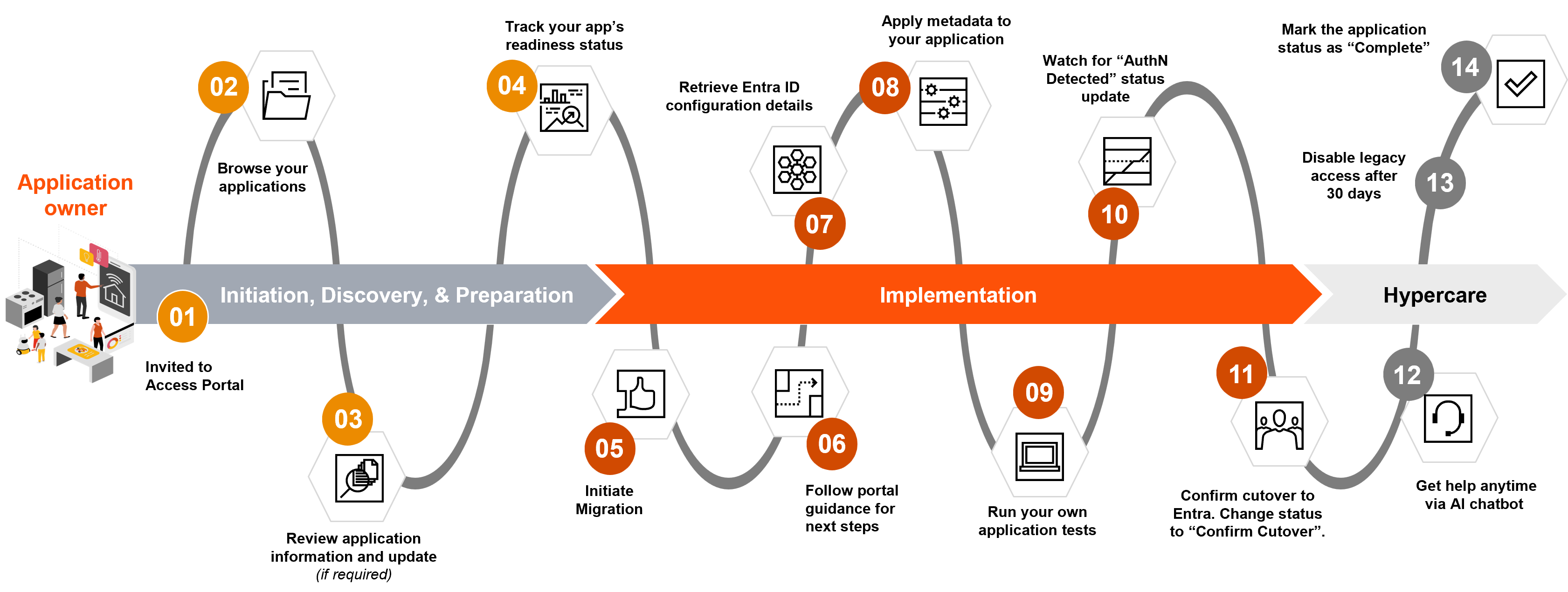
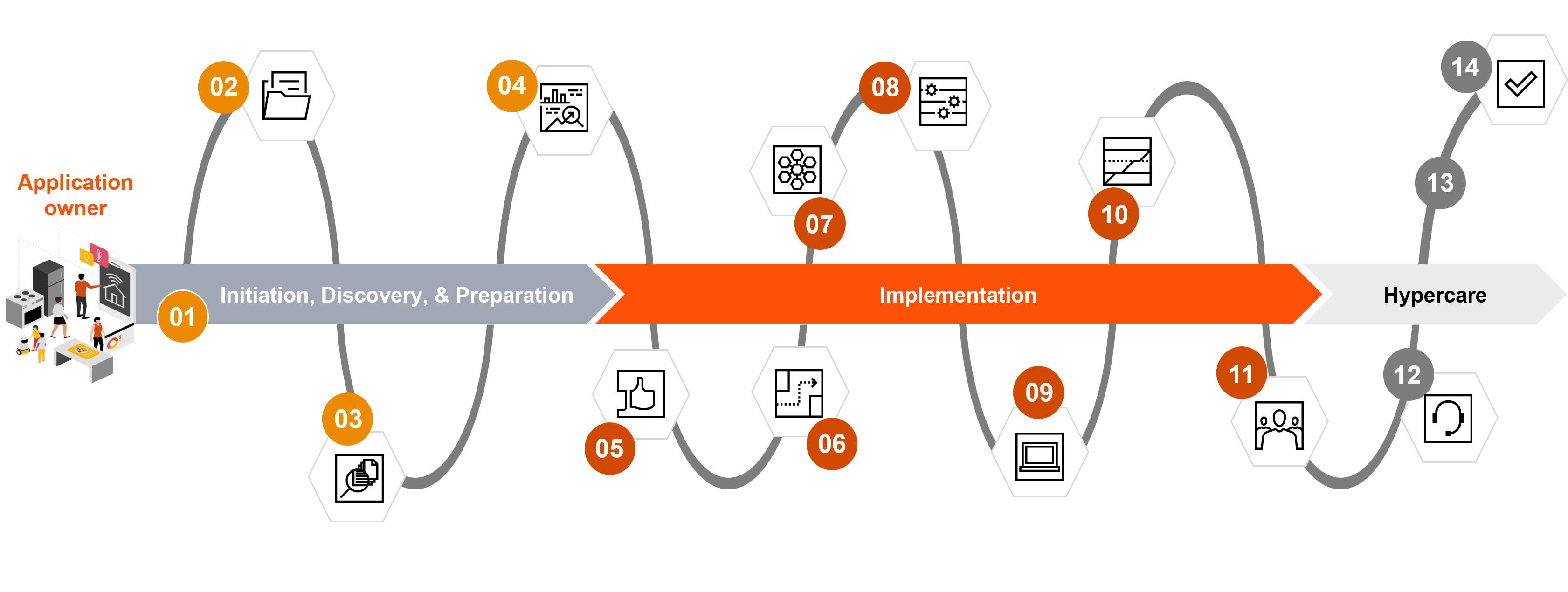
Q - What does the migration process look like from an application owner's perspective?
Q - My in-scope application does not have an approved ARR – what should I do?
Application teams that are on PwC Identity (ForgeRock) must have a completed ARR for each production application to migrate from PwC Identity (ForgeRock) to Entra ID.
-
If your application has an ARR in any of the following statuses –
approved,completed,completed with conditionsorcompleted with validations– it can migrate from PwC Identity (ForgeRock) to Entra ID's stage and production environments. -
If your application does not have an ARR or the ARR is
in-progress, it can migrate from PwC Identity (ForgeRock) stage environment to Entra ID's stage environment so long as the application is in good standing with the ISP (e.g. stage environment with no production data or connections, stage environment with production data or connects and approved security issue in Archer/IRM). Your application cannot migrate from PwC Identity (ForgeRock) production environment to Entra ID's production environment until ARR is complete with closure ofcompleted,completed with conditionsorcompleted with validations.
| ARR requirements | Stage | Production |
|---|---|---|
| Application migrations from PwC Identity (ForgeRock) to Entra ID | Completed ARR required (only if your app uses production data) | Completed ARR required |
To start the process, you will need to complete the ARR form in SNow. For more information about ARRs and the AppSec process, you can refer to the AppSec Tear Sheet or reach out to the App Sec team (gbl_nis_arr@pwc.com) directly.
Q - As part of Application migration from PwC ID (ForgeRock) to Entra ID, what is the definition of "material change" and how do I determine If my application requires a material change and an update to existing approved/completed ARR?
A "material change" is considered as the change in application logic, infrastructure, design, or coding. If your application has an existing ARR and there is no material change, then your application can migrate to Entra ID. If the application owner / team would like to make any material changes, the advice from AppSec team is first to complete the migration to Entra ID and then submit the ARR update request.
The responsibility for indicating if additional material changes are being made during the migration and to conduct an ARR (revision) if necessary, sits with the application owner / team. This instruction is applicable to all application teams (Member Firm / Global).
Q - My application is integrated to PwC Identity (ForgeRock) Staging environment. Can I migrate the application to the Entra ID Production environment?
Migration of applications to non-equivalent environments within Entra ID is not permitted. The migration portal operates based on a direct one-to-one mapping between environments. Accordingly, applications currently hosted in PwC Identity Staging will be migrated to Entra ID Staging, while those in PwC Identity Production will be migrated to Entra ID Production.
This is the officially recognised migration pathway for applications. For any requests that fall outside of this process, please send an email to us_gbl-nis-integration@pwc.com. Such cases may necessitate a security exception.
Q - Can I engage in a pilot migration (with a single application) before raising migration requests for all my applications?
No. The Pilot engagement is no longer in flight. Going forward, territories and member firms are expected to engage as part of a full-scale migration.
Q - As an application owner, can I start migrating and decommissioning apps now, or do I need to wait for the migration portal pilot to finish?
There is no dependency with regards to the completion of the migration portal pilot. You can already start your application migration journey by submitting a request by using this SNow link. Refer to this site's application decommissioning guidance for complete details.
Data cleanup of your application inventory in an ongoing activity that should ideally be completed prior to, or during the application migration.
Q - How can I access the migration portal?
You can access the migration portal here: https://applicationmigrationportal.internal.pwc.com/. Note: Please contact the designated Point of Delivery (PoD) lead to get access to the migration portal.
Q - Where does the list of applications in the portal come from?
All applications currently integrated with PwC Identity (ForgeRock) or registered in the SNow catalogue are stored in a database used by the migration portal. Each application should have an assigned application owner who can view the applications and the Uniform Resource Names (URNs) under the Application Inventory dashboard within the migration portal.
Q - I am the owner of an application, but I do not see it in the portal. Why is this?
It could be that you are not registered as the application owner, but someone else is. Whilst every effort has been made to obtain a complete record for the application based on data in ForgeRock and SNow, if the record is incomplete, then application owners and delivery managers should work together to populate missing information per record. To correct metadata in the portal, refer to this guidance.
Q - How do I initiate the migration process?
The application owner may initiate the migration process from the application's record in the portal by selecting the appropriate option under the "Actions" menu. Before proceeding, consult the Migration Portal User Guide.
- Upon initiation, a pop-up will prompt the user to verify the accuracy of the application's metadata. If discrepancies are found, the application owner will have the opportunity to make necessary corrections. Follow the more detailed instructions in the user guide.
For the applications which are not eligible to migrate using the portal, submit application migration request using the SNow submission form. Refer to this guidance for complete details.
Q - As an application owner, how do I monitor migration progress of my application?
Once the migration has been initiated via the migration portal, the application is automatically created in Entra ID. This process begins immediately once the application owner clicks on "Initiate Migration" and is quick — usually done in seconds or a couple of minutes. In parallel, the portal executes the necessary configuration tasks and when finished the application status will change to "Ready." Now the application owner will be able to access and retrieve the metadata information directly in the Application Inventory page of the portal.
For application migration using the SNow submission form, once the ticket is created, it is submitted to the IDaaS Entra ID Integration & Migration team. An Entra ID app migration engineer will be assigned to the ticket and will contact you to validate the information provided in the form. If you need help drafting this form or if you wish to inquire about the status of a ticket, please reach out to: gbl_idaas_team@pwc.com. An Entra ID app migration engineer may request clarification to confirm that they can proceed with the migration.
Q - Can we add multiple Territory Project Manager (PM) as application delegates for the applications under my territory in the portal?
To add App Delegates in the portal, reach out to the application owner. They can assign delegates using the two available fields: App Delegate 1 and App Delegate 2. For step-by-step instructions, refer to Step 5 in the Migration Portal User Guide. If further assistance is needed, please contact your PoD lead.
Q - As a Territory Project Manager (PM), can I initiate migration and perform the migration activities within the portal?
To assign a Territory PM as an App Owner in the portal, contact your PoD lead. They can initiate the role assignment process and ensure the Territory PM is granted the necessary access. Once assigned, the PM will be able to initiate and perform application migration, including adding application delegates - App Delegate 1 and App Delegate 2 fields in the portal.
Q - Who will be assigned as the owner in Entra?
When application teams initiate a migration, ownership within Entra is automatically assigned to the first eligible administrator of the app based on the list below. This assignment (owner of the app in Entra ID) occurs regardless of who initiates the migration from the portal.
The portal determines the owner by identifying the first individual with an admin account in the following order of priority:
- Technical App Owner
- Delegate 1
- Delegate 2
- Primary Owner
- Secondary Owner
- IT Application Owner
Impact: The owner of an app in Entra can update the meta data of an app and administer the app in Entra ID. To change app configuration, the app delegates need to make sure to contact the owner in Entra ID (if the delegate is an assigned an owner in Entra). Reach out to your PoD team to know who is the owner of your app in Entra ID.
Technical questions
Q - Is Multi-Factor Authentication (MFA) required to migrate to Entra ID?
No, it is not required to have MFA to migrate to Entra ID. View this article for complete details.
Q - Are there any technical dependencies between Multi-Factor Authentication (MFA) and IDaaS, and what if my application already uses MFA when it moves to Entra ID?
There are no dependencies and nothing happens. MFA applies to end user authentication while Entra ID applies to applications. They are completely different and interdependent of one another. Once an application migrates to Entra ID, end users will have the same login experience that they currently have with accessing M365 applications (e.g., Microsoft Teams, Outlook, OneDrive, SharePoint) as these applications all use Entra ID.
If your application still requires users to MFA once migrated to Entra ID, it can be enabled using Entra ID MFA for user login.
Q - Where can I find more information about Modern Authentication (Modern Auth)?
The Modern Authentication article includes links to best practices, troubleshooting tips, and FAQs for Modern Auth Users. The topic on MFA includes screenshots of the user experience after completing the Modern Auth journey.
Post-migration
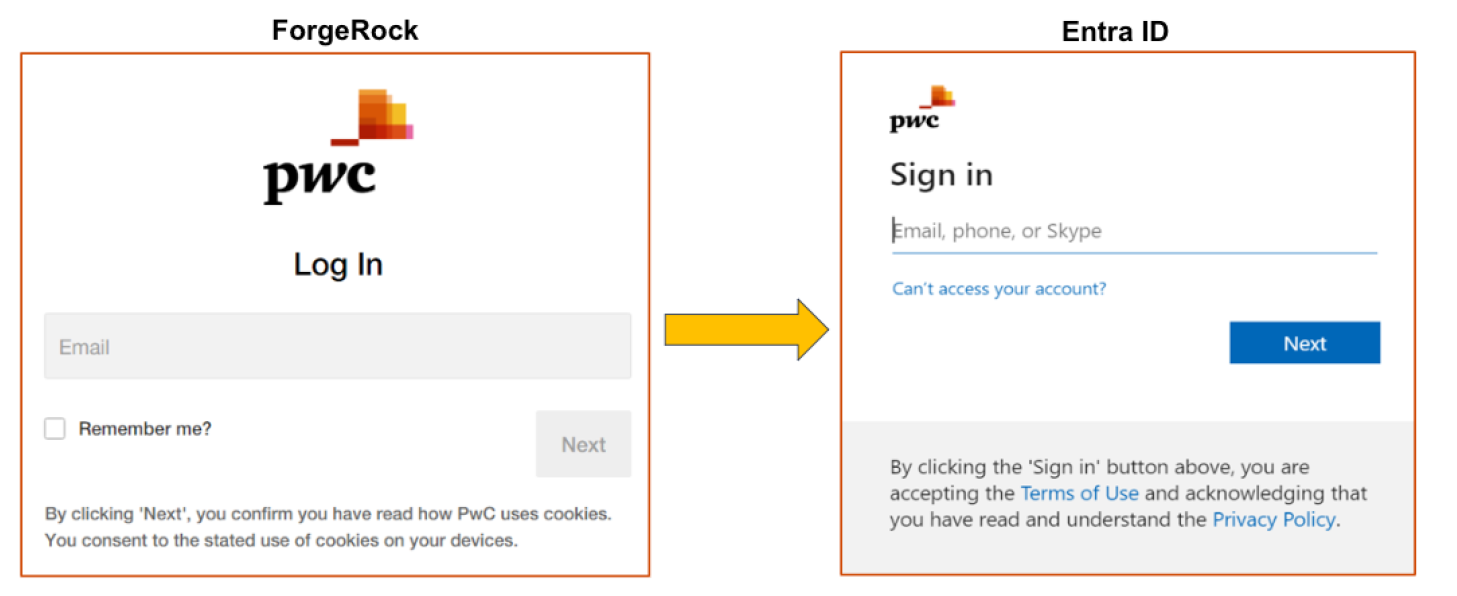
Q - What change will end users see once my application is migrated to Entra ID?
Users will see a different login screen. Applications integrated with PwC Identity (ForgeRock) will log in via the prompt shown below on the left. Once an application is migrated to Entra ID, users will log in via the prompt shown below on the right.
This is how users are currently logging in when accessing M365 applications (e.g., Microsoft Teams, Outlook, OneDrive, SharePoint) as these applications use Entra ID.
Q - If I migrate my application to Entra ID, what does that mean for certificate renewals?
Applications that are on PwC Identity (ForgeRock) using Security Assertion Markup Language (SAML) and WS-Federation (WS-Fed) protocols require certificate renewals every 10 years, with the current signing certificates expired at midnight EST on 6 March 2025.
Once an application migrates to Entra ID, the SAML and WS-Fed certificate is required after three years from the date the configuration is created and is self-managed by the application owner.
Q - What if we want a change to an existing migration configuration?
Once the application has been migrated and out of the hypercare period, a new request needs to be submitted via SNow and the option to update needs to be selected. Please submit a troubleshooting ticket via SNow.
Support
Q - Once my application begins the migration process, what is the support mechanism?
For urgent support requests during the migration process, please reach out to the Entra ID Migration team:
- During standard and after hours, please send an email to us_gbl-nis-integration@pwc.com.
- Post-warranty, you will need to submit a trouble shooting ticket via SNow.
For any issues related to the portal, please send an email to: us_gbl-nis-integration@pwc.com.
To ensure your request is triaged appropriately, kindly use the following subject header naming convention:
<MF> - <Application migration/Portal> - <Issue description>
Q - What is the support model once my application is migrated to the Entra ID production environment?
There is a two-week hypercare window following migration. If a territory's Teams chat room was created, it will remain active so that you can stay connected to a member of the IDaaS Entra ID Migration team. For urgent support requests during the migration process, please reach out to the Entra ID Migration team:
- During standard and after hours, please send an email to us_gbl-nis-integration@pwc.com.
- Post-warranty, you will need to submit a troubleshooting ticket via SNow.
Q - What type of support does the IDaaS Entra ID Migration team provide the application team during migration?
The IDaaS Entra ID Migration team supports the application teams every step of the journey, including during the two-week hypercare period after an application is migrated to production. The introduction of the Migration Portal and supporting documentation is created to help you get started.
Q - Does the Global IDaaS Project support ARR costs incurred by territories?
The ARR is free for any application that needs an ARR as part of IDaaS migration. Please mention within your ARR request that it is related to IDaaS migration.
For more details on the ARR process, please refer to the AppSec Tear Sheet.
Q - How can I contact the Global IDaaS Project team if I have a question?
Please reach out to the IDaaS Project team via email at: gbl_idaas_team@pwc.com
Q - Is there supporting information available where I can get more information about the IDaaS Project?
Please refer to the SharePoint site: Identity as a Service (IDaaS) - Entra ID Migration Guides and Technical Resources. Follow the Latest Updates column for announcements and news regarding the IDaaS project. All other supporting documentation is located on this docusite.
Glossary
| Term | Definition |
|---|---|
| AI | Artificial Intelligence |
| ARR | Application Readiness Review |
| BAU | Business As Usual |
| FAQ | Frequently Asked Question |
| GUM | Group & User Management |
| IAM | Identity & Access Management |
| IDaaS | Identity as a Service |
| LDAP | Lightweight Directory Access Protocol |
| MFA | Multi-factor authentication |
| MDM | Mobile Device Management |
| OIDC | Open ID Connect |
| PM | Project Manager |
| PMO | Project Management Office |
| RFC | Request for Change |
| RITM | Request Item Number |
| SAML | Security Assertion Markup Language |
| SSO | Single Sign On |
| UMA | User Management Application |
| URN | Uniform Resource Name |
| WS-Fed | WS-Federation |
Document history & approval
Document history
| Version | Date | Description | Contributor |
|---|---|---|---|
| 1.0 | 5 November 2024 | Finalised content & published document | Sandra Kuhn, Pat O'Connor, Joan C. Ford |
| 2.0 | 4 March 2025 | Added Section 2.0 for MFA Q&As; finalised content and prepared for publication | Adil Ashraf, Fred Guimaraes, Yuan Yong, Sandra Kuhn, Andrey Grebenetsky, Kartik Mohandoss, Joan C. Ford |
| 2.1 | 15 April 2025 | Added Q&A about MFA session length | Sandra Kuhn, Kartik Mohandoos, Joan C. Ford |
| 3.0 | 31 July 2025 | Updated content; rebranded; re-edited and prepared for publication | Dennis Portengen, Joan C. Ford |
| 3.1 | 29 August 2025 | Updated content in Section 3.0 regarding ARR. Adjusted Section 3.0 with the guidance regarding the environments to migrate from PwC ID to Entra ID and the Snow form submission process for app migration. | Bhaswati Saikia, Will Anderson, Adil Ashraff |
Document approval
| Version | Date | Name |
|---|---|---|
| 1.0 | 6 November 2024 | Kartik Mohandoss, Michael Murphy |
| 2.0 | March 2025 | Andrey Grebenetsky, Mike Murphy, Kartik Mohandoss |
| 2.1 | 15 April 2025 | Kartik Mohandoss |
| 3.0 | 1 August 2025 | Adil Ashraf |
| 3.1 | 29 August 2025 | Adil Ashraf |