Application Decommissioning
> ServiceNow Form Guidance
When your application is no longer in use and will not be migrated to Entra ID, it must be decommissioned. These steps outline the process for teams to properly submit the decommissioning form in ServiceNow.
📝 Access the Form: Click here
🛠️ Decommissioning multiple CI's? Use this spreadsheet template to perform a bulk upload.
- Populate the template / spreadsheet with the extra CI's to be decommissioned;
- Use the form's 🖇️ Add attachments button (near the bottom) to include it with your request;
- Validate the form's remaining fields as instructed below before clicking
This process may take 1 – 4 business days on average, but will vary based on application.
Submission Steps
When filling out the form, provide your / your app's basic information (the fields you know), then:
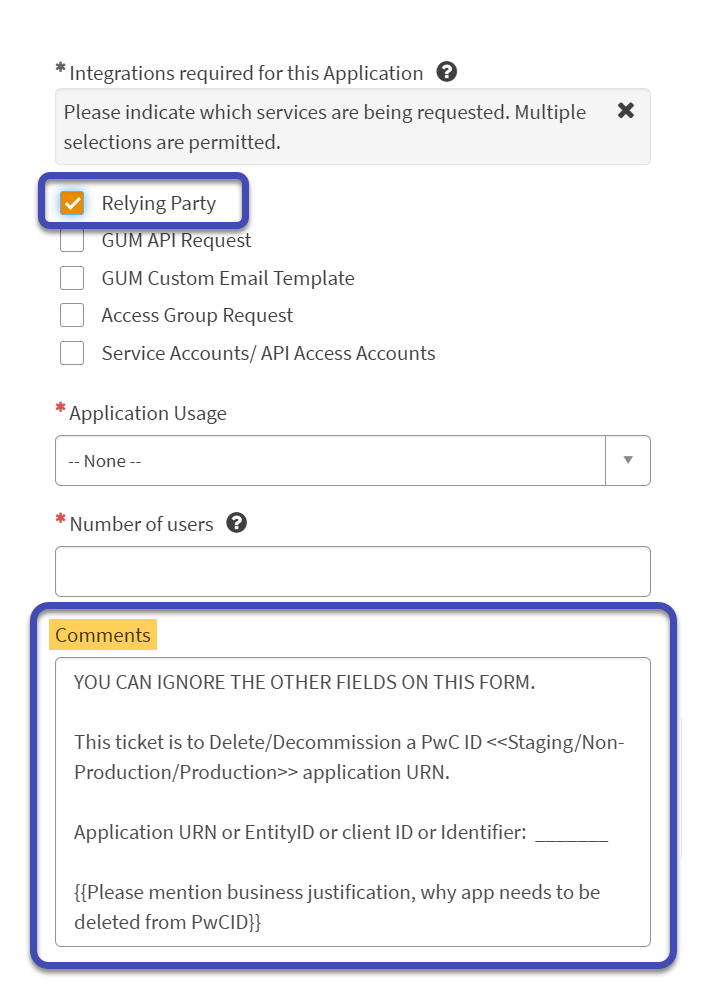
Under Integrations required for this Application:
- Select → ☑️ Relying Party
Under Comments, enter the following, updating the variables below with those specific to your application:
YOU CAN IGNORE THE OTHER FIELDS ON THIS FORM.
This ticket is to Delete/Decommission a PwC ID Staging/Non-Production/Production application URN.
Application URN or EntityID or client ID or Identifier: ________
Please mention business justification, why app needs to be deleted from PwCID.
If the Application CI is decommissioned and no longer available to select on the form under Application Name:
Please raise an INC with the
GLOBAL - NIS - IDENTITY AND ACCESS MANAGEMENT - APPLICATION INTEGRATIONqueue, mentioning App's SSO details including:
- Entity ID
- Previous integration RITM #
- Other relevant context
Remaining Fields
For all other / required fields you don't know:
- Simply write
[SEE_COMMENTS]as seen in this example ▶️

Use the optional 🖇️ Add attachments button to include any file(s) which may be relevant to your request ▶️

Once finished, click to the request; the IDaaS Entra ID will schedule the application for decommissioning accordingly.
Follow-up Activities
After submitting the request...
Consider that the decomissioning process outlined in this article only covers removing the application(s) from PwC Identity (ForgeRock). Thus, application owners will need to ensure that all other application components are properly decommissioned outside of ForgeRock as well.
Questions / Concerns
Please contact the Enterprise Identity team (us_gbl-nis-integration@pwc.com) with any questions or concerns regarding this process.